Popular Posts

이은한. Powered by Blogger.

레이블이 Python Study인 게시물을 표시합니다. 모든 게시물 표시

2022년 2월 16일 수요일

what is Python loop (while, for)


Loop Statement in Python

  • Keyword: for, while
  • for need to set number range
  • while need to set when stop the repeatation
  • use for: when you know how many repeat needed
  • use while: when you do not know how many repeat needed

for or while [range condition] :
[space]code you want to repeat

for statement Example

for i in range(10): 
    print("Hi") # Hi printed 10 times
temp=[A,B,C]
for i in range(len(temp)): 
    print(i) # 0 1 2 index printed
temp=[A,B,C]
for i in range(temp): 
    print(i) # A B C values in List printed
for i, j in enumerate(a):
    print(i, ":", j) # 0 : A 1 : B 2 : C index and value
numbers = [9, 7, 7]
letters = ["z", "x", "y"]
for pair in zip(numbers, letters):
    print(pair)
# (9, 'z') (7, 'x') (7, 'y') index and value Tuple
for i in range(5, 10):  # 5 ~ 9
    print(i) # 5 6 7 8 9
a = "balloon"
for i in a:
    print(i) # b a l l o   loop until i is "o"
    if i == "o":
        break

while Statement

i = 0
while i < 5:
    print(i) # 0 1 2 3 4 loop until i is bigger than 5
    i = i + 1
2022년 2월 15일 화요일

what is Python condition (if)


condition statement in Python

if Statement

  • Keyword: if, elif, else
  • if must there before use elif, else

if [condition] :
[space]code you want to run
elif [condition] :
[space]code you want to run
else :
[space]code you want to run

if Statement Example

a = 3
if a > 5:
    print("a is bigger than 5")
elif a > 0:
    print("a is bigger than 0 but smaller than 5")
else:
    print("a is negative")

2022년 2월 14일 월요일

what is Python Set


Set in Python

Definition

  • One of the data structure in python.
  • Create set of data

declaration

  • use { and } to declare

setA={1,3,4,"test"} # {1, 'test', 3, 4}
setB={2,4,"test",5,6} # {2, 'test', 4, 5, 6}

Characteristics

  • No duplicated value
  • Do not care about order
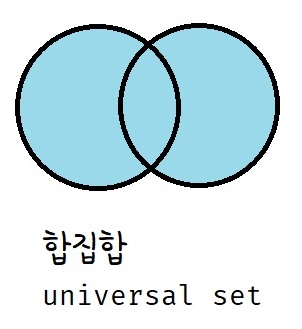
  • set algebra(union, intersection, difference, symmetric difference)

Set Algebra

union


Keyword: "|", "union()"

union example


setA={1,3,4,"test"} # {1, 'test', 3, 4}
setB={2,4,"test",5,6} # {2, 'test', 4, 5, 6}


print(setA|setB)
print(setA.union(setB))
# {1, 2, 3, 4, 5, 6, 'test'}

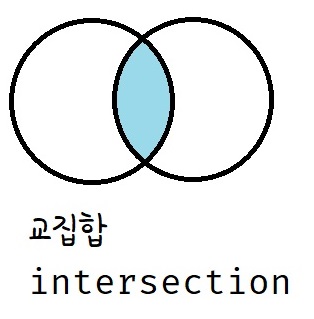
intersection

Keyword: "&","intersection()"

intersection example


setA={1,3,4,"test"} # {1, 'test', 3, 4}
setB={2,4,"test",5,6} # {2, 'test', 4, 5, 6}

print(setA&setB)
print(setA.intersection(setB))
# {'test', 4}

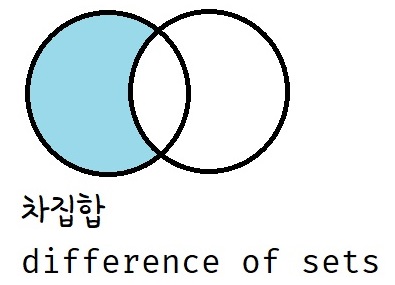
difference of sets

Keyword: "-","difference()"

difference of sets example


setA={1,3,4,"test"} # {1, 'test', 3, 4}
setB={2,4,"test",5,6} # {2, 'test', 4, 5, 6}

print(setA-setB)
print(setA.difference(setB))
# {1, 3}

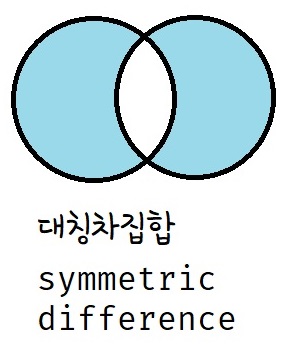
symmetric difference

Keyword: "^","symmetric_difference()"

symmetric difference example


setA={1,3,4,"test"} # {1, 'test', 3, 4}
setB={2,4,"test",5,6} # {2, 'test', 4, 5, 6}

print(setA^setB)
print(setA.symmetric_difference(setB))
# {1, 2, 3, 5, 6}

2022년 2월 13일 일요일

what is Python Dictionary


Dictionary in Python

Definition

  • One of the data structure in python.
  • has key and value binded. You can fine value when you know the key
  • very slimier with hashmap

declaration

  • use { and } to declare
  • the value can be list
  • the key can be int or string. But not list. (TypeError: unhashable type: 'list')
dictionary={"key1":"value1","key2":"value2","key3":"value3"}

how to use

  1. indexing like List
  2. get() method

difference between the indexing and get method

If key does not exist, the indexing will return error. But get method will return None.

# List처럼 인덱스를 넣기
print(dictionary["key1"]) # value1
print(dictionary["key2"]) # value2
print(dictionary["key3"]) # value3
# print(dictionary["key4"]) # KeyError: 'key4' means there is no key

# get() 메서드를 사용
print(dictionary.get("key1")) # value1
print(dictionary.get("key2")) # value2
print(dictionary.get("key3")) # value3
print(dictionary.get("key4")) # return None, it does not cause error

2022년 2월 12일 토요일

what is Python Tuple


Tuple in Python

Definition

  • One of the data structure in python.
  • Almost same as List But Tuple is not editable.
  • Object.

declaration

use "(" and ")" to declear.
But, if there is a element in Tuple, you need to add comma

tuple1=(1,)
tuple2=(1,2,3)
notTuple=(0) #wrong, this is int type. comma needed

index structure

same as List indexing

characteristic

Tuple is not editable.

slicing

Same as List.

[starting index : ending index-1 : condition index]

  • [0:8:3] = select index 0 to 7 by adding 3
  • [:8:] = select index 0 to 7 by adding 1
  • [7::] = select index 7 to -1 by adding 1
  • [::-1] = select index 0 to -1 by adding -1

a = (0, 1, 2, 3, 4, 5, 6, 7, 8, 9)
print(a[0:8:3])  # (0, 3, 6)
print(a[:8:])  # (0, 1, 2, 3, 4, 5, 6, 7)
print(a[7::])  # (7, 8, 9)
print(a[::-1])  # (9, 8, 7, 6, 5, 4, 3, 2, 1, 0)

what is Python List


List in Python

Definition

  • One of the data structure in python.
  • Almost same as array in other languages.
  • Object.

declaration

temp=[]
temp=list()
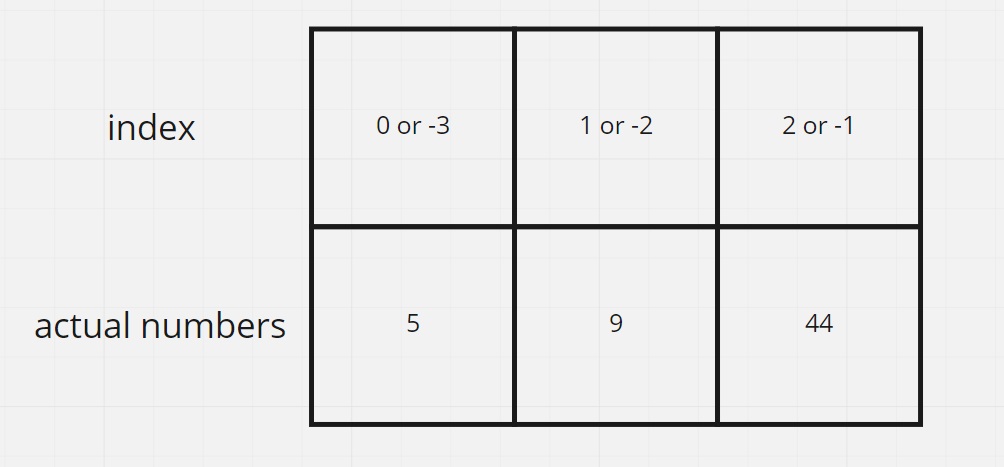
temp=[5,9,44]

index structure

characteristic

List in List is possible. This is same as 2D array in other languages
String in python is same as List

slicing

[starting index : ending index-1 : condition index]

  • [0:8:3] = select index 0 to 7 by adding 3
  • [:8:] = select index 0 to 7 by adding 1
  • [7::] = select index 7 to -1 by adding 1
  • [::-1] = select index 0 to -1 by adding -1

a = [0, 1, 2, 3, 4, 5, 6, 7, 8, 9]
print(a[0:8:3])  # [0, 3, 6]
print(a[:8:])  # [0, 1, 2, 3, 4, 5, 6, 7]
print(a[7::])  # [7, 8, 9]
print(a[::-1])  # [9, 8, 7, 6, 5, 4, 3, 2, 1, 0]

Arithmetic Operation


a=[1,2,3]
b=["apple","house","computer"]

print(a+b) # [1, 2, 3, 'apple', 'house', 'computer']
# print(a+3) # error
# print(a-b)  # error
# print(a-3) # error
# print(a*b) # error
print(b*3) # ['apple', 'house', 'computer', 'apple', 'house', 'computer', 'apple', 'house', 'computer']
print(b*0) # []
# print(a/b) # error
# print(a/3) # error

add element

  • append() = add a new element behind
  • extend() = add new elements behind
  • insert() = add new elements by index
  • [] = add new elements by index condition

a=[1,2,3,4,5,6,7,8,9]
b=["apple","house","computer"]


a.append("test")
print(a) #[1, 2, 3, 4, 5, 6, 7, 8, 9, 'test']
a=[1,2,3,4,5,6,7,8,9]
a.append(b)
print(a) #[1, 2, 3, 4, 5, 6, 7, 8, 9, ['apple', 'house', 'computer']]
a=[1,2,3,4,5,6,7,8,9]
a.extend("test")
print(a) #[1, 2, 3, 4, 5, 6, 7, 8, 9, 't', 'e', 's', 't']
a=[1,2,3,4,5,6,7,8,9]
a.extend(b)
print(a) #[1, 2, 3, 4, 5, 6, 7, 8, 9, 'apple', 'house', 'computer']
a=[1,2,3,4,5,6,7,8,9]
a.insert(2,"test")
print(a) #[1, 2, 'test', 3, 4, 5, 6, 7, 8, 9]
a=[1,2,3,4,5,6,7,8,9]
a.insert(2,b)
print(a) #[1, 2, ['apple', 'house', 'computer'], 3, 4, 5, 6, 7, 8, 9]
a=[1,2,3,4,5,6,7,8,9]
a[3:]=b
print(a) #[1, 2, 3, 'apple', 'house', 'computer']
a=[1,2,3,4,5,6,7,8,9]
a[:4]=b
print(a) #['apple', 'house', 'computer', 5, 6, 7, 8, 9]
a=[1,2,3,4,5,6,7,8,9]
a[6:6]=b
print(a) #[1, 2, 3, 4, 5, 6, 'apple', 'house', 'computer', 7, 8, 9]
a=[1,2,3,4,5,6,7,8,9]
a[6:7]=b
print(a) #[1, 2, 3, 4, 5, 6, 'apple', 'house', 'computer', 8, 9]

delete element

  • remove() = delete by value
  • del = delete by index or list
  • pop() = index or last one

a=[1,2,3,4,5,6,7,8,9]
a.remove(1) # delete value 1
print(a) # [2, 3, 4, 5, 6, 7, 8, 9]
a=[1,2,3,4,5,6,7,8,9]
# a.remove(98) # error
# print(a)
a=[1,2,3,4,5,6,7,8,9]
del a[3] # delete index 3
print(a) # [1, 2, 3, 5, 6, 7, 8, 9]
a=[1,2,3,4,5,6,7,8,9]
del a[3:7] # delete index 3 to 6
print(a) # [1, 2, 3, 8, 9]
a=[1,2,3,4,5,6,7,8,9]
temp=a.pop() # return and delete the last element of the list
print(a) # [1, 2, 3, 4, 5, 6, 7, 8]
print(temp) # 9
a=[1,2,3,4,5,6,7,8,9]
temp=a.pop(1) # return and delete the index 1
print(a) # [1, 3, 4, 5, 6, 7, 8, 9]
print(temp) # 2

2022년 2월 11일 금요일

what is Python Operaters(+-/*)


Arithmetic Operation in Python


Result tables

+, -, *, /, //, %, **, <, >, <=, >= table


When computer created and programming language started, 1 was true and 0 was false.

== table


unlike Java, this is not comparing class. it compare values.

and, or truth table


As above table, the "and" "or" are for true and false.
If you put other type, or gate return B value
If you put other type, and gate return A value

what is Python Variables


Python Variables

types

scalar and non-scalar
both object

scalar

  • int : integer
  • float : real number
  • bool : True or False
  • none : Null

non-scalar

  • String : data values that are made up of ordered sequences of characters, such as "hello world"

checking data type

print(type(Variable))

Case-Sensitive

a and A are different variable

Casting

x = str(4)    # "4"
y = int(4)    # 4
z = float(4) # 4.0