Popular Posts

이은한. Powered by Blogger.

레이블이 Java Study인 게시물을 표시합니다. 모든 게시물 표시

2022년 2월 19일 토요일

what is enum


enum in Java

Definition

enum class is for define constant.
It will contain the value that will not change during the program is working

Reason for using the enum

debugging easily.

History

C: preprocessor : certain number
Java: static final String MALE: certain string
enum in Java: enum: certain object

C code example


#include <stdio.h>

#define MALE 1 // #define Preprocessor 

int main()
{
    const int FEMALE = 2; // const keyward
    
    int input = 2;
    
    if(input==MALE){
        printf("I am male");
    }else{
        printf("I am Female");
    }

    return 0;
}

result

I am Female

if you put 3 in input variable, it still print, "I am Female" We need additional if statement for checking the issue.

In Java, we started use "final." The final is not exactly same as the Preprocessor, But we used it with static final keyward

java code example


public class Main {

    public static final String MALE = "MALE";
    public static final String FEMALE = "FEMALE";

    public static void main(String[] args) {
        String gender;
        gender = Main.MALE;
        gender = "male"; //mistake, but no error
                
        if(gender.equals(Main.MALE)){
            System.out.println("I am male");
        }else{
            System.out.println("I am female");
        }        

    }
} 

result

I am female

However, still same issue stated. The constant's data type is String and it caused wrong result.

Thus, we use enum class since java 1.5.
We calls, "enumeration", "enumerated type", and "enum"

enum java code example

public class Main {

    public static void main(String[] args) {
        Gender gender;
        gender = Gender.MALE;
        gender = "male"; //mistake, but it shows error

        if(gender==Gender.MALE){
            System.out.println("I am male");
        }else{
            System.out.println("I am female");
        }

    }
}

enum Gender {MALE, FEMALE;}

2022년 2월 7일 월요일

what is diffence between comparator and compatable


what is diffence between comparator and compatable in JAVA

Question

Both interfaces are very similer because they are for sorting lists and arrays. However, one is for one condition and other one is for mutiple conditions.

Conclusion

use comparator for unique multiple conditioned sorting
use comparable for one conditioned sorting in Object

It is possible to put mutiple conditions into the comparable. However, it may cause some confustion because it will override the compareTo() method.

Explanation

Comparable

  • java.lang package
  • Comparable affects the original class because override the compareTo method.
  • compareTo() method with 1 parameter
  • Collections.sort(List)
  • Arrays.sort(array)
  • It defines sort condition for object. It built in to the object. (Collections.sort(List))
  • For example, if you sort your object by mutiple conditions with compatable, you cannot sort simple ascending order because overrided the comareTo method.

Comparator

  • java.util package.
  • Comparator doesn't affect the original class because it create compare method.
  • compare() method with 2 parameters
  • Collections.sort(List, Comparator)
  • Arrays.sort(array, myComparator);
  • For example, if you sort your object by mutiple conditions with comparator, you still can sort simple ascending order with Collections.sort.

Example

custom class with compatable


import java.lang.Comparable;

public class customPoint implements Comparable<customPoint> {

    private int x = 0;
    private int y = 0;

    public customPoint(int x, int y) {
        this.x = x;
        this.y = y;

    }

    public int getX() {
        return x;
    }

    public int getY() {
        return y;
    }

    @Override
    public int compareTo(customPoint p2) {
        if (this.x > p2.x) {
            return 1; // x in ascending order
        } else if (this.x == p2.x) {
            if (this.y < p2.y) { 
// x is ascending order and then y is in descending order
                return 1;
            }
        }
        return -1;
    }
}

comparator


import java.awt.*;
import java.util.Comparator;

public class MyComparator  implements Comparator<Point> {

    public int compare(Point p1, Point p2) {
        if (p1.x > p2.x) {
            return 1; //  x in ascending order
        } else if (p1.x == p2.x) {
            if (p1.y < p2.y) {
// x is ascending order and then y is in descending order
                return 1;
            }
        }
        return -1;
    }
}

main


import java.awt.*;
import java.util.ArrayList;
import java.util.Collections;
import java.util.List;

public class Main {

    public static void main(String[] args) {

        java.util.List<Point> pointList = new ArrayList<Point>();
        pointList.add(new Point(10, 10));
        pointList.add(new Point(1, 8));
        pointList.add(new Point(5, 2));
        pointList.add(new Point(1, 2));
        pointList.add(new Point(5, 5));
        pointList.add(new Point(10, 1));

        System.out.println("current list");
        for (Point temp : pointList) {
            System.out.println("x: " + temp.x + "  " + "y: " + temp.y);
        }
        System.out.println("Comparator sorted list");
        MyComparator myComparator = new MyComparator();
        Collections.sort(pointList, myComparator);
        for (Point temp : pointList) {
            System.out.println("x: " + temp.x + "  " + "y: " + temp.y);
        }
        System.out.println("====================");

        List<customPoint> pointList2 = new ArrayList<>();
        pointList2.add(new customPoint(10, 10));
        pointList2.add(new customPoint(1, 8));
        pointList2.add(new customPoint(5, 2));
        pointList2.add(new customPoint(1, 2));
        pointList2.add(new customPoint(5, 5));
        pointList2.add(new customPoint(10, 1));

        System.out.println("current list");
        for (customPoint temp : pointList2) {
            System.out.println("x: " + temp.getX() + "  " + "y: " + temp.getY());
        }

        System.out.println("Comparable sorted list");
        Collections.sort(pointList2);
        for (customPoint temp : pointList2) {
            System.out.println("x: " + temp.getX() + "  " + "y: " + temp.getY());
        }

    }
}

result


current list
x: 10  y: 10
x: 1  y: 8
x: 5  y: 2
x: 1  y: 2
x: 5  y: 5
x: 10  y: 1
Comparator sorted list
x: 1  y: 8
x: 1  y: 2
x: 5  y: 5
x: 5  y: 2
x: 10  y: 10
x: 10  y: 1
==============================
current list
x: 10  y: 10
x: 1  y: 8
x: 5  y: 2
x: 1  y: 2
x: 5  y: 5
x: 10  y: 1
Comparable sorted list
x: 1  y: 8
x: 1  y: 2
x: 5  y: 5
x: 5  y: 2
x: 10  y: 10
x: 10  y: 1

2022년 2월 4일 금요일

What is Primitive type and Reference type


Kinds of Data Type in Java

Primitive type

  • Java provides 8 kinds of Primitive type.
  • Primitive data types cannot contain null
  • actual value will saved in Stack memory.

Reference type

  • If not primitive type, it is Reference type.
  • Reference data types can contain null
  • address will saved in Heap memory.

2022년 2월 3일 목요일

what happen if + or - with Char


Result

char type + int type = return unicode
char type - int type = error
int type + char type = return unicode
int type - char type = error
char type + char type = return unicode
char type - char type = return unicode

  • String is not Primitive Data Type. This is object

Test


public class Main {
    public static void main(String[] args) {

        String temp="apple";
        char a = 'A';// unicode 65
        char b = 'B';// unicode 66
        System.out.println(a); // A
        System.out.println(a+0); // 65
        System.out.println(a-b); // -1
        System.out.println(a + 5); // 70
        System.out.println(5 + a);// 70
        System.out.println(5 + a+temp); //70apple
//      System.out.println("a - 5->"+a - 5);
//error: java: bad operand types for binary operator '-'
//      System.out.println("5 - a->"+5 - a);
//error: java: bad operand types for binary operator '-'
        System.out.println(a + temp.charAt(1));//177
        System.out.println(temp.charAt(1)+a);//177
        System.out.println(a + a);//130
        System.out.println(a + temp);//Aapple

    }
}

example of use

For lexicographical order

for (int i = 0; i < order.length(); ++i)
            index[order.charAt(i) - 'a'] = i;

Primitive Data Types

According to Primitive Data Types Java API

The Java programming language is statically-typed, which means that all variables must first be declared before they can be used. This involves stating the variable's type and name, as you've already seen:

int gear = 1;

Doing so tells your program that a field named "gear" exists, holds numerical data, and has an initial value of "1". A variable's data type determines the values it may contain, plus the operations that may be performed on it. In addition to int, the Java programming language supports seven other primitive data types. A primitive type is predefined by the language and is named by a reserved keyword. Primitive values do not share state with other primitive values. The eight primitive data types supported by the Java programming language are:

char:

The char data type is a single 16-bit Unicode character. It has a minimum value of '\u0000' (or 0) and a maximum value of '\uffff' (or 65,535 inclusive).

2022년 2월 2일 수요일

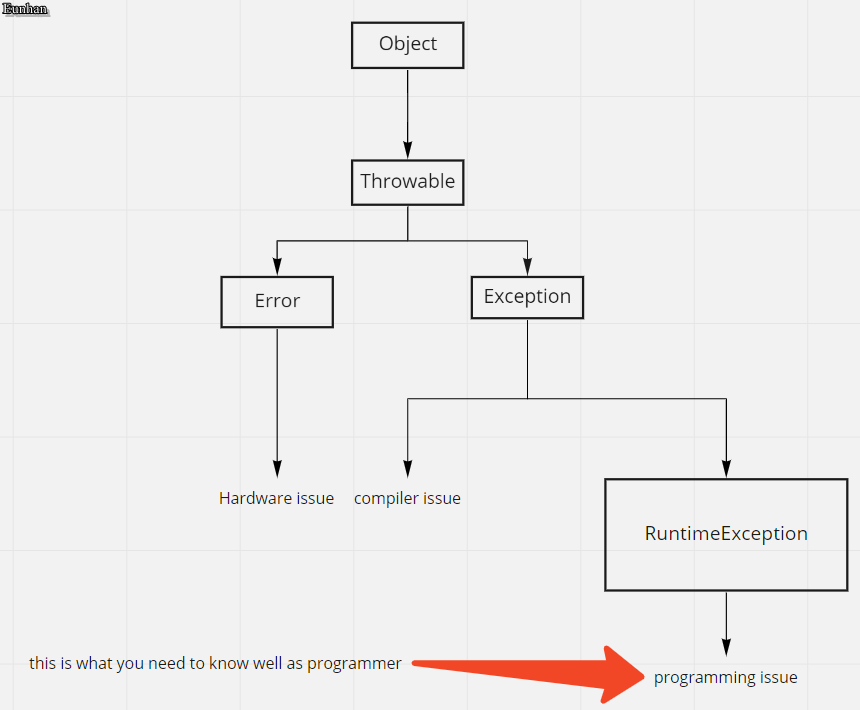
Difference between Error and Exception


What is Error

Programs run something that is not what programmers wanted or shutdown unexpectedly.
Any causes of that action are Error.

Kinds of Errors

compile-time error

compile failed. usually, wrong lanuage keyword used. python does not understand "System.out.println" This code is for JAVA.

runtime error

crash during the programs run. put values in int arr[5] that array size is 3

logical error

programmer created wrong process. you wanted to put blue in variable x. But, you accidently put green

Error vs. Exception in Java

Error: created by computer hardware
Exception: created by computer software

Thus, Error is created by compiler or computer graphics card. programmer not much things to do
However, the Exception is created by program, or wrong command.

exception handling

Def. : protect from unexpected happens
Purpose : keep programs run well

Exception in Java

In java, computer do not check the Exceptions under the runtimeException. Thus, we need to study them.

2022년 2월 1일 화요일

what is iterator


Definition

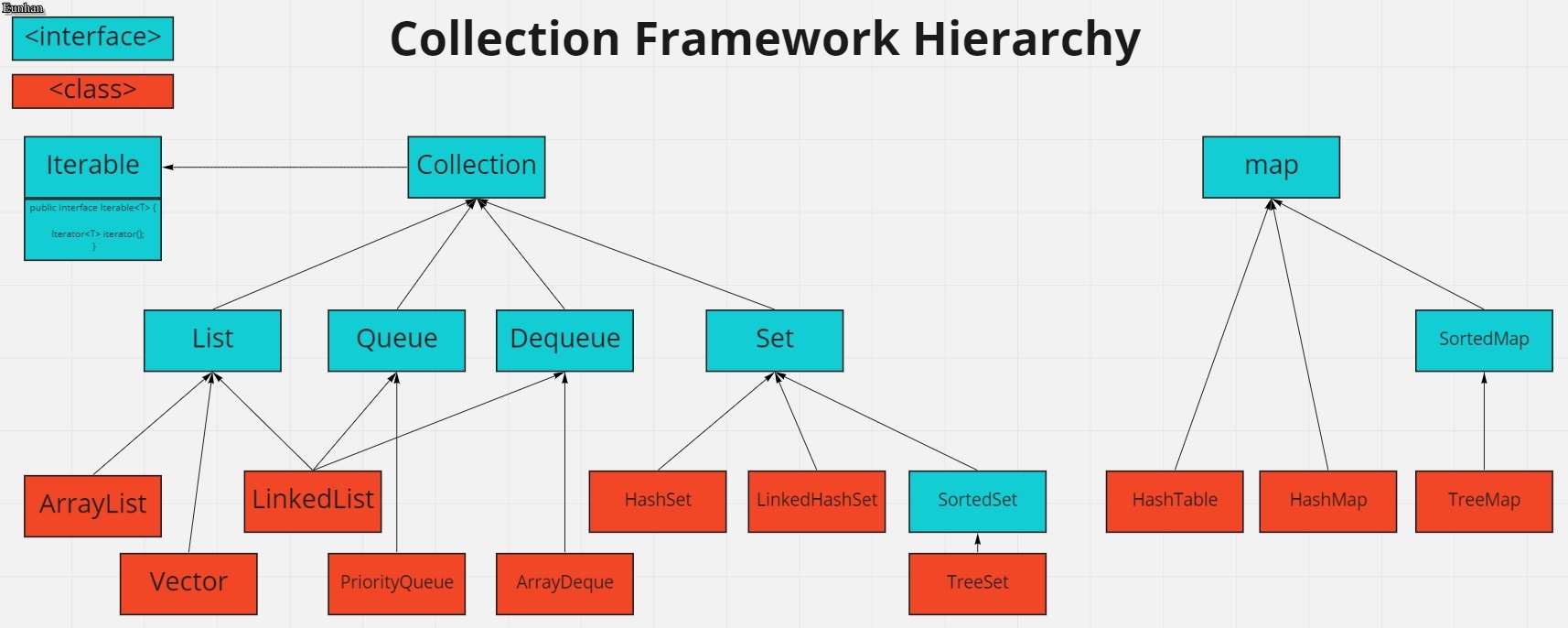
Interface that can read any class in the collection framework.
Thus, we can read arraylist or linkedlist or hashmap with iterator.

why we use iterator?

Since we can read any list or set with iterator, we do not have to fix or change code when you work with big projects.

Hierarchy

method

hasNext()
next()
remove()

method Example

List list = new ArrayList();// arrayList
list.add("1");
list.add("2");
list.add("3");

Iterator <string> itr = list.iterator(); 
	    
while (itr.hasNext()) { 
 String str = itr.next(); 
 System.out.println(str);
}

iterator Example

@Test
    public void multipleIterators() {
        final Iterator<Integer> a = Arrays.asList(1, 2, 3, 4, 5).iterator();
        final Iterator<Integer> b = Arrays.asList(6).iterator();
        final Iterator<Integer> c = new ArrayList<Integer>().iterator();
        final Iterator<Integer> d = new ArrayList<Integer>().iterator();
        final Iterator<Integer> e = Arrays.asList(7, 8, 9).iterator();

        final Iterator<Integer> singleIterator = Iterators.singleIterator(Arrays.asList(a, b, c, d, e));

        assertTrue(singleIterator.hasNext());
        for (Integer i = 1; i < 10; i++) {
            assertEquals(i, singleIterator.next());
        }
        assertFalse(singleIterator.hasNext());
    }

2022년 1월 31일 월요일

what is comparator


Hierarchy

package: java.util.Comparator

Definition

Sorting interface that designed for mutiple special conditions by creating compare method. For example, you can sort list in ascending order of size and descending order of letters.

about the compare() method

if compare() method return positive number, swap the input parameters
else will be remain same

if First parameter < second parameter, negative
if First parameter == second parameter, 0
if First parameter > second parameter, positive

How to use

MyComparator implements Comparator<>

MyComparator myComparator = new MyComparator();
Arrays.sort(array, myComparator);
Collections.sort(list, myComparator);

Example

import java.awt.*;
import java.util.Comparator;

public class MyComparator implements Comparator<Point> {

    public int compare(Point p1, Point p2) {
        if (p1.x > p2.x) {
            return 1; // x is in ascending order
        } else if (p1.x == p2.x) {
            if (p1.y < p2.y) { // y is in descending order
                return 1;
            }
        }
        return -1;
    }
}
import java.awt.*;
import java.util.List;
import java.util.ArrayList;
import java.util.Collections;


public class Main {
    public static void main(String[] args) {

        List<Point> pointList = new ArrayList<>();
        pointList.add(new Point(10, 10));
        pointList.add(new Point(1, 8));
        pointList.add(new Point(5, 2));
        pointList.add(new Point(1, 2));
        pointList.add(new Point(5, 5));
        pointList.add(new Point(10, 1));

        System.out.println("current list");
        for (Point temp : pointList) {
            System.out.println("x: " + temp.x + "  " + "y: " + temp.y);
        }

        MyComparator myComparator = new MyComparator();
        Collections.sort(pointList, myComparator);

        System.out.println("sorted list");
        for (Point temp : pointList) {
            System.out.println("x: " + temp.x + "  " + "y: " + temp.y);
        }

    }

}

Result

current list
x: 10  y: 10
x: 1  y: 8
x: 5  y: 2
x: 1  y: 2
x: 5  y: 5
x: 10  y: 1
sorted list
x: 1  y: 8
x: 1  y: 2
x: 5  y: 5
x: 5  y: 2
x: 10  y: 10
x: 10  y: 1

what is comparable


Hierarchy

package: java.lang.Comparable

Definition

Sorting interface that designed for a condition by overriding compareTo method. For example, you can sort list in ascending order of size.

about the compareTo() method

if compareTo() method return positive number, swap the input parameters
else will be remain same

if First parameter < second parameter, negative
if First parameter == second parameter, 0
if First parameter > second parameter, positive

How to use

customObject implements Comparable<>

Arrays.sort(customObject);
Collections.sort(customObject);

Example


import java.lang.Comparable;

public class customPoint implements Comparable<customPoint> {

    private int x = 0;
    private int y = 0;

    public customPoint(int x, int y) {
        this.x = x;
        this.y = y;

    }

    public int getX() {
        return x;
    }

    public int getY() {
        return y;
    }

    @Override
    public int compareTo(customPoint p2) {
        if (this.y > p2.y) {
            return 1; // y is in ascending order
        }
        return -1;
    }
}

import java.util.List;
import java.util.ArrayList;
import java.util.Collections;

public class Main {
    public static void main(String[] args) {

        List<customPoint> pointList2 = new ArrayList<>();
        pointList2.add(new customPoint(10, 10));
        pointList2.add(new customPoint(1, 8));
        pointList2.add(new customPoint(5, 2));
        pointList2.add(new customPoint(1, 2));
        pointList2.add(new customPoint(5, 5));
        pointList2.add(new customPoint(10, 1));

        System.out.println("current list");
        for (customPoint temp : pointList2) {
            System.out.println("x: " + temp.getX() + "  " + "y: " + temp.getY());
        }

        System.out.println("sorted list");

        Collections.sort(pointList2);

        for (customPoint temp : pointList2) {
            System.out.println("x: " + temp.getX() + "  " + "y: " + temp.getY());
        }

    }

}

Result

current list
x: 10  y: 10
x: 1  y: 8
x: 5  y: 2
x: 1  y: 2
x: 5  y: 5
x: 10  y: 1
sorted list
x: 10  y: 1
x: 1  y: 2
x: 5  y: 2
x: 5  y: 5
x: 1  y: 8
x: 10  y: 10